Here’s How to Make Excel Ultra-Productive—With AI’s Help
This all-Excel strategy ends Excel drudgework, automates your reports and analyses, and frees your team to deliver high-impact insights faster. With help from AI, Excel’s new era starts now!

SUMMARY: You can end Excel drudgery with the EDP Strategy—automate updates, eliminate errors, and turn Excel into a fast, insight-driven system powered by Excel flowbooks and AI. Here’s how.
Most Excel work is broken. And most Excel users know it.
They just don’t know what to do about it.
Every reporting period, the same routine plays out: open last period’s workbook, copy-paste in new data, copy-paste formulas, patch what breaks, scroll through tabs, search randomly for errors, send it off. And do it all again next week, next month, next quarter.
It’s slow. It’s brittle. It’s boring. It’s drudgery.
And in today’s AI-driven economy, it’s not just inefficient—it’s professionally dangerous.
That ad hoc, Excel Frankenbook Strategy burns out professionals, buries insights, and loses thousands of dollars of opportunity costs, per user, per month. It delays answers. It invites mistakes. And it makes you—and your team—look unproductive, fragile, and replaceable.
That’s the real professional risk.
The good news? There’s now a way out. A new Excel strategy. One that replaces Excel drudgework with fast, automated, structured workflows that AI can amplify—and managers can trust.
The EDP Strategy ends the drudgework, the errors, the burnout, and the wasted time. It replaces chaos with structure, and burnout with automation—but without add-ins or VBA.
Flowbooks: The Foundation of the EDP Strategy
At the core of the EDP Strategy is the flowbook: a consistently-structured, Power Query–enabled workbook that flows data from internal and external sources, transforms it as needed, and writes it to Excel Tables in worksheets.
And then the data flows to any number of reports, analyses, charts, dashboards, forecasts, and models in the flowbook—collectively known as reflows.
And the Excel Data Plumbers (Plumbers) do the work
Once their flowbook is built—typically from templates—Plumbers can update it with a single command—period after period.
No more patchwork. No more last-minute scrambling. No more guesswork. You replace Frankenbooks with flowbooks.
This is Excel as it should be: structured, scalable, and fast.
This isn’t a workaround. It’s a redesign. A reskilling.
From Drudgework to Brainwork
Accenture reports that FP&A teams spend 85% of their time on low-value production tasks. That’s Excel drudgework—performed by Excel copy-pasters (Pasters).
But with flowbooks doing the drudgework, Excel Data Plumbers can spend most of their Excel time on insight, strategy, and decision support.
And here’s the critical point: that shift isn’t just about speed. It’s about money.
Every hour that Pasters spend on drudgework is an hour from which your company suffers from a large opportunity cost. Multiply that across teams, across periods, across headcount—and the opportunity cost balloons. We’re talking thousands of dollars per user, per month lost to avoidable Excel busywork.
See How It Flows
A flowbook is more than a simple workbook. It’s a complete data plumbing system.
This flowchart shows how data flows like water, through your flowbook:
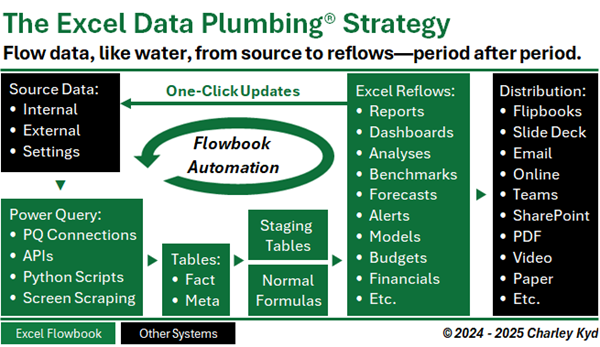
This is what structured Excel looks like. And once you build it, you’ll never go back to Excel Frankenbooks again.
GenAI Supercharges Flowbooks
ChatGPT and Copilot aren’t just productivity tools. They’re insight amplifiers. But they only work well if your data is clean and your workflow is structured. When Excel is structured, AI doesn’t just assist—it accelerates.
Flowbooks give AI the context it needs to help you…
- Write better formulas
- Debug Power Query steps
- Brainstorm new KPIs
- Explain results with clear, professional language
AI without structure is noise, which makes Pasters replaceable. But Flowbooks make Plumbers irreplaceable.
What Happens When You Build Your First Flowbook
Everything changes.
Suddenly your reports update themselves. Your dashboards don’t break. Your forecast builds itself while you sleep.
You don’t waste time fixing errors—you use that time to make your manager look brilliant.
You stop fighting Excel. You start winning with it.
Why It Matters Now
The AI era is here. And the companies that survive it will be faster, leaner, and more insight-driven.
They won’t waste payroll on manual reporting. They won’t tolerate chaos in Excel. They’ll cut what slows them down.
If you’re still using the old way, your job isn’t just inefficient. It’s at high risk.
The EDP Strategy is how you replace that risk with relevance.
Your Next Step Starts Here
Start your first Flowbook today. Stop grinding. Start building. Because in a world of shrinking headcount and rising AI, the only Excel users who survive are the ones who stop doing drudgery—and start delivering insight.
The EDP Institute is your way out.